


Mocha TN5250
3.523.00 Reviews
App Specs
- Version
- 6.0
- Updated On
- License
- $28.99
- Downloads
- 10,000+
- Developer
- MochaSoft
- Categories
- Communication
- Platform
- Android
Screenshots
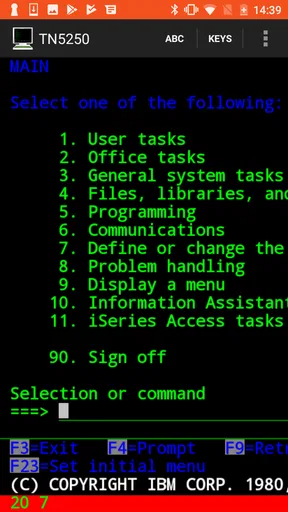
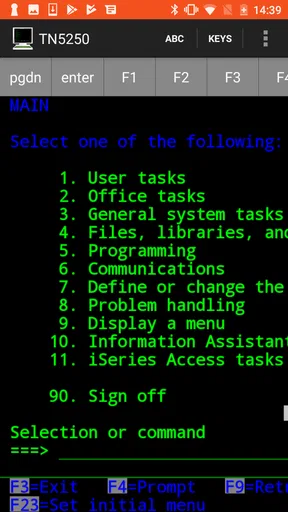
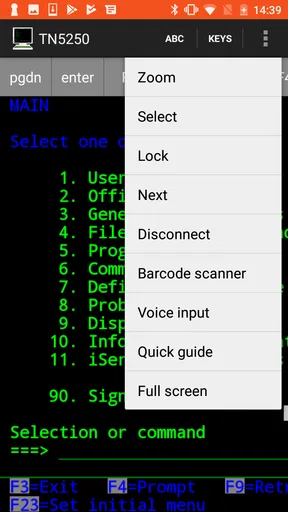
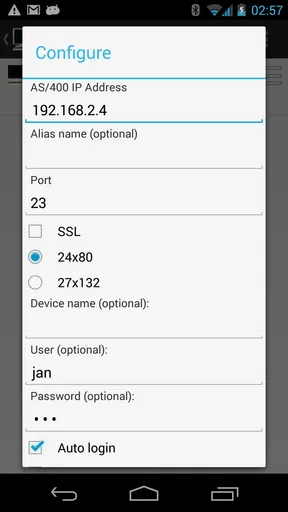
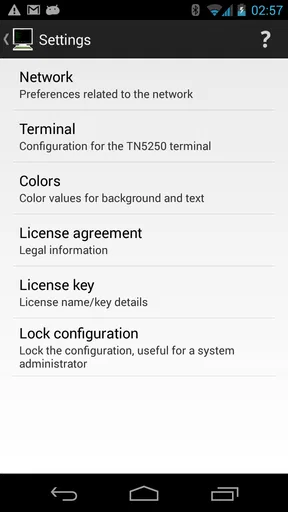
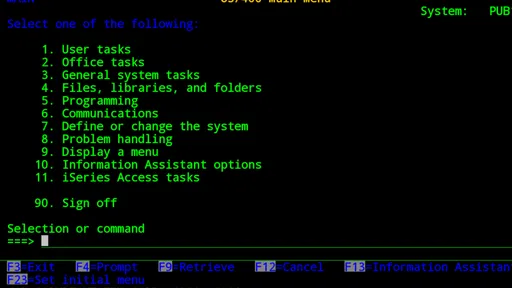
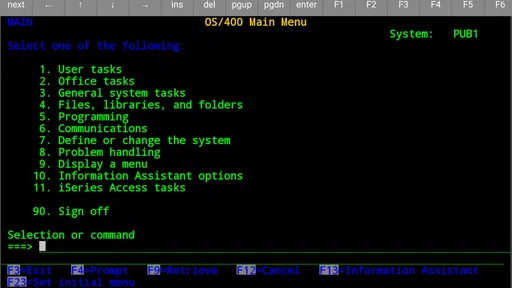
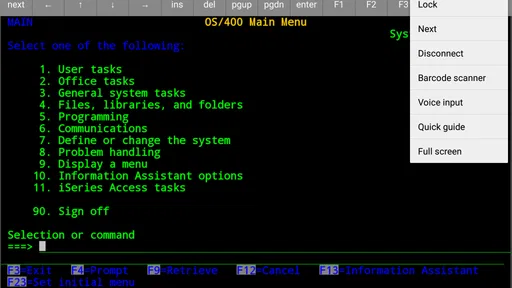
 Analysis by AppCompare
I approached Mocha TN5250 as a practical communication tool rather than a general-purpose mobile app. Its job is focused: it gives an Android device access to AS/400 systems through TN5250 terminal emulation. That narrow purpose immediately tells you who should pay attention. If you work with an IBM i environment and occasionally need a terminal session away from a desk, this app may solve a very specific problem. If you are looking for messaging, remote desktop control, or a modern office suite, it is aimed at something else entirely.
In my experience, the most important question is not whether the interface feels fashionable. It is whether your organization still depends on an AS/400 workflow and whether mobile access would genuinely save time. The app is developed by MochaSoft, sits in the Communication category, and has been available since October 14, 2010. Its long presence suggests a product built around a stable enterprise use case, but it also means you should judge it by practical compatibility and convenience rather than expecting the visual polish of a newly designed consumer app.
How the cost changes the decision
This is a paid Android app listed at $28.99. That makes the purchase decision much more deliberate than downloading a free terminal utility for a quick experiment. The price is easy to understand, but its value depends heavily on your access to an AS/400 system. Someone who never connects to IBM i infrastructure gets no meaningful benefit from paying for it. Someone who loses time returning to a workstation for a small terminal task may see the purchase differently.
I would not treat the price as a casual impulse purchase. Before buying, I would first confirm that the intended AS/400 environment supports the connection method required by the app and that mobile terminal access is acceptable within the organization. A paid app can still be poor value if the network setup, account permissions, or internal security rules prevent a useful connection. The app itself may be suitable while the surrounding environment is not.
The age rating is Everyone, which is unsurprising for a business-oriented terminal tool. That label says little about whether it fits your work, however. The more relevant requirements are technical and organizational: an Android device running at least version 5.1, access to the correct host, and a reason to use a terminal from a phone or tablet. The current app version is 6.0, so users on older devices should check their operating system before spending money.
Its store presence shows over ten thousand installs, with an average rating of 3.5 from roughly ninety ratings and around twenty reviews. I read that as a sign of a specialized product with a limited audience, not as proof that it will work equally well in every AS/400 setup. A niche terminal emulator naturally attracts fewer users than a mainstream communication app, and the rating is mixed enough that I would test the surrounding workflow carefully before recommending a purchase for a whole team.
What you are actually paying for
The purchase is for focused TN5250 emulation on Android. That distinction matters. You are not paying for a broad remote-support platform, a full desktop replacement, or a cloud service that automatically organizes your business systems. You are paying for a mobile way to interact with an AS/400 terminal environment. The value therefore comes from access and convenience, not from the number of extra consumer features.
Worth Reading Before You Choose

EA SPORTS FC Mobile 26 Is a Bigger Football Game, but It Takes Time

Flipboard Shows What News Apps Must Do Beyond the Feed

Switching to Android Auto Means Rethinking Your Driving Routine

Google Calendar Makes a Crowded Week Easier to Manage

Ludo King Makes the Most of the Minutes Between Plans

Baby Panda World Brings Quick Play to Modern Phones, but Its Game Library Feels Busy
For an administrator checking a queue, a supervisor reviewing a record, or an operator handling a short urgent task, avoiding a trip to a fixed terminal can be useful. The benefit is especially clear when the task is brief and text-based. Opening a dedicated terminal session can be more direct than launching a full remote desktop, waiting for a workstation, and navigating a complete desktop environment just to reach an IBM i application.
There is also a useful distinction between occasional access and primary access. I see this app making more sense as a mobile companion for an existing AS/400 workflow than as the only way a person interacts with the system. A phone screen and touch keyboard are not automatically comfortable for long data-entry sessions. The app can reduce friction for short interventions while still leaving detailed work to a conventional keyboard and monitor.
Using it in a realistic workday
Imagine a warehouse supervisor away from the office when a shipment needs a quick status check in an IBM i application. With the necessary connection details and authorization already arranged, a TN5250 client can provide a more targeted route to that information than remote-controlling an entire office computer. The supervisor can check the relevant screen, make a small approved update, and return to the floor instead of interrupting the workflow to find a workstation.
That scenario also exposes the app’s main trade-off. A terminal interface is efficient when you know the system and the required commands or menu path. It is less friendly when you are unfamiliar with the application, need to compare several windows, or must enter a large amount of structured information. The app may put the AS/400 screen in your hand, but it does not turn a legacy workflow into a modern mobile interface.
I would prepare for mobile use before relying on it during an urgent task. Keep the host information, expected login process, and internal support contact available through an approved method. It is also sensible to practice the exact short workflow on the intended device. A terminal session that works in theory can still be awkward if the screen layout, keyboard behavior, or navigation requires more precision than the phone allows comfortably.
Why terminal emulation can beat remote desktop access
The usual alternative is often not another TN5250 app but a remote desktop tool. Remote desktop access can be more flexible because it exposes the whole workstation, yet that flexibility can become unnecessary overhead. If the only goal is to reach an AS/400 screen, a dedicated terminal client keeps the task closer to its source and avoids making a phone imitate an entire desktop.
On the other hand, remote desktop access may be the better choice when your organization already has a carefully managed remote-work system, when users need several Windows applications alongside the AS/400 program, or when the host requires a workflow that a dedicated terminal session cannot accommodate. I would choose the narrower tool only when the narrow connection is exactly what I need.
Another alternative is simply using a fixed terminal or workstation. That remains preferable for lengthy sessions, heavy typing, detailed review, and work that benefits from a large display. The mobile app earns its place in the gaps between those sessions. It is most convincing when mobility is the problem and terminal access is the solution.
Practical strengths and less obvious friction
The strongest quality here is focus. MochaSoft is not trying to make an AS/400 workflow look like a social app or a generic productivity dashboard. A dedicated TN5250 client can be easier to justify in an environment where the back-end system is already established and the need is simply to reach it from Android. That directness is more valuable than a long list of unrelated features.
A second strength is the possibility of separating quick checks from full workstation sessions. I would use a phone for a short lookup, a simple confirmation, or a narrowly defined operational update, then reserve the desktop for tasks that demand speed and accuracy over many fields. This division can make the app useful even when it is not comfortable enough to replace a conventional terminal.
The first important limitation is the touch interface. TN5250 applications were designed around terminal interaction, and mobile touch controls do not erase that history. Small fields, dense screens, function-key navigation, and cursor movement can all require more concentration on a phone. A tablet may be a more sensible device for regular use, while a phone is better for occasional checks.
The second limitation is that technical success depends on more than installing the app. You still need a reachable AS/400 host and valid authorization. Corporate networks can introduce routing, firewall, or policy complications, and a mobile connection may behave differently from an office network. I would involve the person responsible for IBM i access before treating the app as a dependable field solution.
A third trade-off concerns input accuracy. Short, familiar workflows are realistic; long entries are more tiring and more vulnerable to mistakes. If a task involves financial, inventory, or customer records, I would avoid rushing simply because the app makes access possible. Mobile convenience should reduce unnecessary travel, not encourage careless data entry.
There is also a human-factors issue that store summaries rarely explain: knowing the screen is not the same as understanding the workflow. Experienced AS/400 users may move quickly through menus and fields, while new users can feel lost even when the connection works perfectly. Training and a clearly defined mobile procedure matter as much as the emulator itself.
Questions I would settle before purchasing
The first question is whether the app is suitable for a particular IBM i setup. The answer depends on the host configuration, network path, and account rules, so I would not assume that every AS/400 environment behaves identically. Confirming the intended connection with an administrator is more useful than relying on the category label or the install count.
The second question is whether Android compatibility is enough for the intended device. The listed minimum operating system is Android 5.1, but minimum compatibility does not guarantee that an older phone will provide a pleasant experience. Screen size, keyboard quality, battery condition, and network reliability can matter more during real work than the ability to install the app.
The third question is whether the purchase makes financial sense for the user. At $28.99, I would buy it when a specific recurring task saves enough time or disruption to justify the cost. I would skip it when the need is hypothetical, when access will happen only once, or when the organization already provides another approved route to the same system.
The fourth question is whether a phone is the right screen. If the user needs to type continuously, compare multiple records, or work for long periods, a physical keyboard and larger display are likely better. If the user needs a compact backup for short terminal interactions, the app’s format becomes much more attractive.
Finally, I would clarify the support process inside the organization. A terminal emulator cannot decide which menus a user should access or how sensitive records should be handled. A written procedure for approved tasks, login handling, and escalation can prevent the app from becoming an improvised doorway into a critical system.
Who will get real value from it?
I would recommend considering this app if you already use an AS/400 system, understand the relevant terminal workflow, and regularly find yourself away from a fixed workstation when a short task appears. Operations staff, field supervisors, support personnel, and experienced IBM i users are the kinds of people most likely to notice the benefit. The value comes from reducing interruptions, not from replacing every desktop activity.
It can also suit a small business with an established IBM i environment that needs occasional Android access without adopting a larger remote-desktop arrangement. In that case, the focused nature of the tool may be an advantage. There is less temptation to use a full remote computer session for a task that only requires a terminal screen.
I would be cautious about recommending it to new AS/400 users, people who rarely need the system, or anyone expecting a modern touch-first interface. The price is harder to justify for occasional curiosity, and the learning curve belongs partly to the host application rather than the emulator. A user who does not already understand the terminal workflow may blame the app for confusion that actually comes from the underlying system.
I would also skip it as a general communication download. Its category does not make it a chat, calling, or team-collaboration app. The name and purpose are specialized, and buying it without an AS/400 use case would almost certainly produce poor value.
My buy-or-skip verdict
My verdict is conditional but positive for the right audience. Buy it when you have a confirmed AS/400 need, an approved connection path, and short mobile tasks that justify a paid tool. In that situation, a dedicated TN5250 client can be more sensible than carrying a full remote desktop workflow everywhere. The app’s focused purpose is its main reason to exist, and that focus can be genuinely useful.
I would skip it when the need is uncertain, when your organization already offers a better-supported access method, or when most of your work involves long sessions and heavy typing. The paid price makes experimentation less attractive, and the mixed average rating reinforces the need to judge it against your own environment rather than assuming universal ease of use.
After reviewing it as an Android communication utility, I see Mocha TN5250 as a practical specialist purchase, not a broadly appealing app. Its best role is the mobile extension of an existing IBM i workflow: quick, familiar, and available when a desk is inconvenient. Used that way, it can earn its cost. Used as a replacement for a proper workstation or as a general remote-access solution, it is the wrong tool.
Pros
- Reliable TN5250 emulation for connecting to IBM i systems.
- Supports customizable keyboard layouts for faster terminal workflows.
- Session profiles make it easy to save and reuse connection settings.
- Works well for remote administration and business-critical terminal access.
- Compact interface uses minimal device storage and system resources.
Cons
- Designed for specialized users
- so beginners may face a steep learning curve.
- Requires access to an IBM i host and valid credentials to be useful.
- Older terminal workflows can feel dated on modern touchscreen devices.
- Advanced configuration options may take time to understand and adjust.
- Performance depends heavily on network quality and the remote host.
FAQs for Mocha TN5250
What is Mocha TN5250 used for?
Mocha TN5250 is a mobile terminal emulator designed to connect Android and iOS devices to IBM AS/400 and IBM i systems. It uses the TN5250 protocol to provide access to traditional 5250 applications, allowing users to view menus, enter commands, and work with business software remotely. It is mainly intended for professional, warehouse, manufacturing, logistics, and enterprise environments.
Does Mocha TN5250 require an IBM i or AS/400 server?
Yes. Mocha TN5250 is a client application, so it needs access to a compatible IBM i, AS/400, or other TN5250 server to be useful. Before downloading, users should confirm that their organization provides the required server address, port, login credentials, and network access. The app does not provide business software or an IBM system by itself.
Can I use Mocha TN5250 over Wi-Fi, mobile data, or remotely?
Mocha TN5250 can generally connect through Wi-Fi and mobile data, provided the target TN5250 server is reachable from the network being used. Remote access may require a VPN, firewall configuration, port forwarding, or another secure connection method managed by an IT administrator. Connection performance depends on network quality, server availability, and the organization's security policies.
Is Mocha TN5250 suitable for touchscreens and mobile work?
The application is built to make traditional 5250 interfaces usable on a phone or tablet, but users should not expect a modern graphical interface. Touch controls, on-screen keyboards, function keys, and screen navigation are important when entering commands or working with text-based applications. A larger tablet screen or an external keyboard may provide a more comfortable experience for extended sessions.
Is Mocha TN5250 secure for accessing business systems?
Security depends on both the app's available connection options and the way the server is configured. Users should check whether their organization requires encrypted connections, VPN access, authentication controls, or specific certificate settings before connecting. Avoid entering company credentials on untrusted networks, keep the app and device updated, and ask an administrator to confirm the approved configuration for sensitive IBM i access.


